OPEN API
 Run in Postman
Open API Collection
https://staging-api.xepeng.com stagingThis collection exposes Xepeng's Open API endpoints for managing orders and payment links. Use the environment switcher in the sidebar to toggle between Staging and Production.
Authentication
All endpoints are protected and expect one of the following authentication mechanisms:
Bearer token using an API key or access token:
Required Headers
X-Signature HMAC-SHA256(client_secret, METHOD + PATH + TIMESTAMP + BODY)X-Client-ID client_id from dashboardX-Timestamp DateNow()Set these values either in:
- The Staging environment variables, or
- Your Postman Vault for sensitive secrets.
Getting started
1. Import and open the collection
- Open the Team Workspace.
- Locate the collection named "OPEN API".
- Expand the collection to see the folders:
- Order
- Payment Link
2. Select the Staging environment
- In the top-right of Postman, open the environment dropdown.
- Select the environment named "Staging".
- Ensure the following variables exist in the Staging environment:
xepengUrl– base URL for the Xepeng API (e.g. https://staging-api.xepeng.com)client_id– your client identifierclient_secret– your client secret- (optional)
api_key– if you use Bearer token authentication
3. Configure secrets (Vault vs Environment)
For production or real credentials:
- Prefer using the Postman Vault to store client_id, client_secret, and api_key.
- Reference them in the environment as variables.
For quick local testing on Staging:
- You may set client_id, client_secret, and api_key directly in the Staging environment.
4. Running the collection
You can:
- Run individual requests from the Order or Payment Link folders.
- Use the Collection Runner or Monitor to run multiple requests.
Transaction Lifecycle
The following section illustrates the complete step-by-step process to generate an active transaction link and route your users to the secure checkout page:
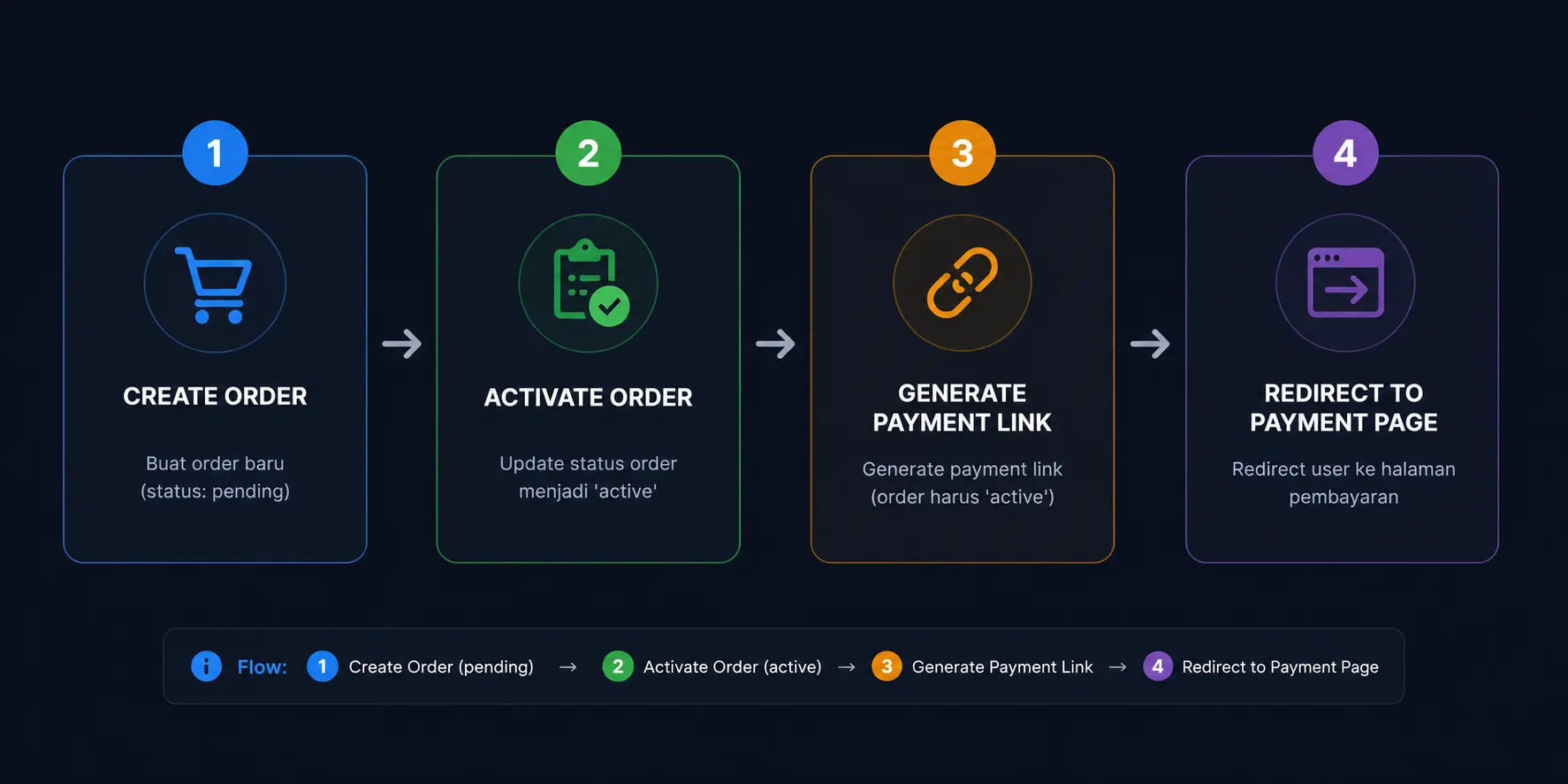
1. Create Order
The lifecycle begins by initializing a new order instance via the API endpoint. At this stage, the system records the item details and assigns a default status of 'pending'.
2. Activate Order
Before a payment link can be issued, you must explicitly transition the order state to 'active'. This confirmation step acts as a final checkpoint to ensure all transaction details are locked and verified.
3. Generate Payment Link
Once the order is verified as active, our system will generate a unique payment URL bound directly to that specific order ID. You can also specify the link's expiration timeframe during this request.
4. Redirect to Payment Page
Finally, your backend routes the user's browser to the newly generated payment URL. The user is instantly directed to the secure checkout environment to seamlessly complete their transaction.
SDKs & Helpers
To simplify integration, we provide official packages for Node.js and PHP. These packages wrap the authentication process and all available endpoints, so you can use them directly in your application.
Node.js (NPM)
Official Node.js library for Xepeng API integration.
npm install xepeng-oauth-js PHP (Composer)
Official PHP library for Xepeng API integration.
composer require xepeng/oauth-php Request reference
Below is a high-level description of each request. Each individual request in the collection also contains a detailed description and example payloads.
Order
https://staging-api.xepeng.com/openapi/ordersCreate
Create a new order with amount, currency, customer information, and metadata. Requires authentication via Bearer token or client credentials.
https://staging-api.xepeng.com/openapi/orders/:order_uidUpdate
Update an existing order by its UID (path parameter).
https://staging-api.xepeng.com/openapi/orders/:order_uidGet by UID
Retrieve a single order by its UID.
https://staging-api.xepeng.com/openapi/ordersGets
List orders with pagination support via page and limit query parameters.
Payment Link
https://staging-api.xepeng.com/openapi/payment-links/generateGenerate
Generate a new payment link for a given amount and order reference.
https://staging-api.xepeng.com/openapi/payment-linksGets
List payment links with pagination.
https://staging-api.xepeng.com/openapi/payment-links/:payment_link_uidGet
Retrieve a single payment link by its UID.
https://staging-api.xepeng.com/openapi/payment-links/:payment_link_uid/inactivateInactive
Inactivate (disable) an existing payment link so it can no longer be used.
Representative request examples
Example: Create Order
POST https://staging-api.xepeng.com/openapi/orders
cURL
curl --request POST "https://staging-api.xepeng.com/openapi/orders" \
  --header "Content-Type: application/json" \
  --header "Authorization: Bearer {{api_key}}" \
  --data-raw '{
    "amount": 100000,
    "currency": "IDR",
    "description": "Order for product X",
    "customer": {
      "name": "John Doe",
      "email": "john.doe@example.com",
      "phone": "+6281234567890"
    },
    "metadata": {
      "order_ref": "ORDER-12345"
    }
  }'
JavaScript (fetch)
const url = `${displayBaseUrl}/openapi/orders`; // Substitute your actual base URL or use an environment variable in Postman
const payload = {
  amount: 100000,
  currency: "IDR",
  description: "Order for product X",
  customer: {
    name: "John Doe",
    email: "john.doe@example.com",
    phone: "+6281234567890"
  },
  metadata: {
    order_ref: "ORDER-12345"
  }
};
fetch(url, {
  method: "POST",
  headers: {
    "Content-Type": "application/json",
    "Authorization": `Bearer ${process.env.XEPENG_API_KEY}` // or your stored secret
  },
  body: JSON.stringify(payload)
})
  .then(async (response) => {
    const data = await response.json();
    console.log("Status:", response.status);
    console.log("Response:", data);
  })
  .catch((error) => {
    console.error("Error calling Create Order API:", error);
  });